Legal
Text Message Verification
Last updated: October 13, 2026
Operator: BeforeJD LLC, a Texas limited liability company, based in Houston, Texas ("BeforeJD," "we," "us," or "our")
When a document sender asks BeforeJD to verify a signer by text message, the signer receives a one-time code by SMS instead of by email before they can sign. This page explains what that text message says, how the signer agreed to receive it, and how to stop receiving it.
1. What we send
Exactly one message per code request, with no marketing content. The English and Spanish versions are shown below, with a sample code substituted in place of the real six-digit code.
Your BeforeJD signing code is 482913. It expires in 10 minutes.
@beforejd.ai #482913
The last line is the standard one-time-code line that phones read to offer the code to the BeforeJD signing page, and only to that page. It repeats the same code and adds nothing else.
Spanish, sent when the signer's document language is Spanish:
Su clave de firma de BeforeJD es 482913. Vence en 10 minutos.
@beforejd.ai #482913
2. How consent works
A signer is texted a code only after two separate, affirmative steps: a document sender must turn the option on and supply the number, and the signer must press a button on their own signing page to request the first code. Neither step happens automatically.
Step 1
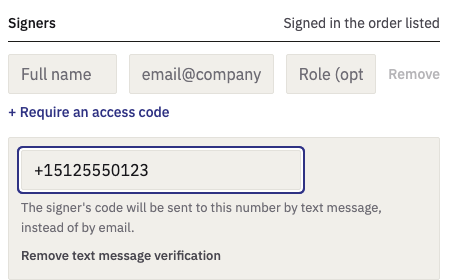
The document sender turns on text message verification for one signer
Inside the BeforeJD signing composer, the person sending a document for signature can enable "Verify by text message" for a specific recipient and enter that recipient's mobile number. The signer's code will then go to that number instead of to their email address. This is off by default; a sender must open the disclosure and type a number for it to apply.
Step 2
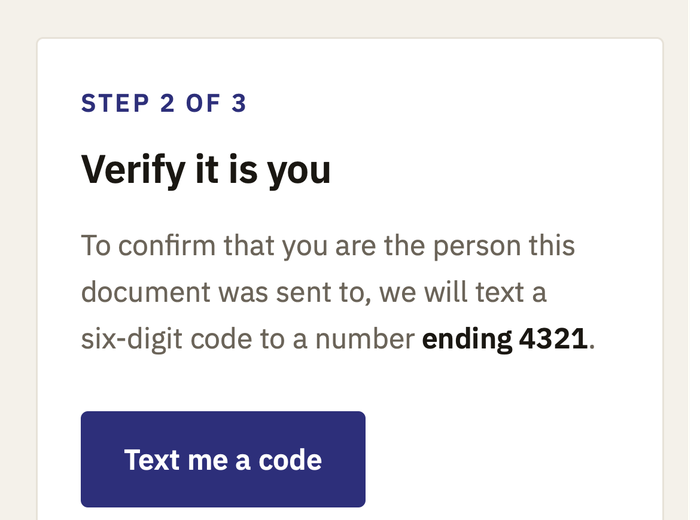
The signer opens the signing link and presses the button to send a code
The code is never sent when the page loads. On the identity step of the signing ceremony, the signer sees the masked number their code will go to and must press "Text me a code" themselves before anything is sent. A signer who never presses the button receives no text message. Where the sender has allowed the choice, a signer whose code goes by email can press "Text me the code instead" to receive it by text message at the number the sender provided, and a signer whose code goes by text can press "Email me the code instead". Again, nothing is sent until the signer presses the button.
Step 3
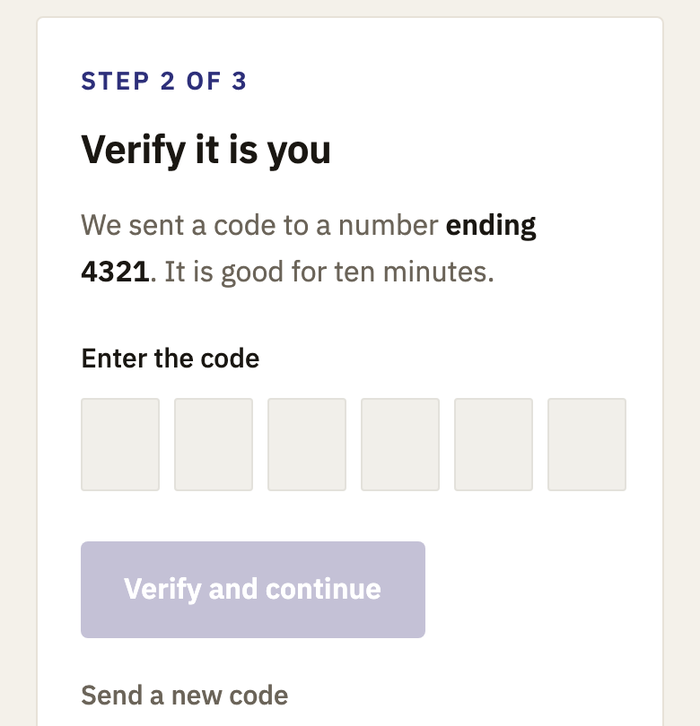
One code arrives, good for ten minutes, and a new one only on request
A single code is sent for that request. The page tells the signer it is good for ten minutes and gives them a field to enter it. A code is never resent on its own; the signer must press "Send a new code" to receive another one.
3. Frequency, cost and opting out
Message frequency varies by document; a signer who requests a code once receives one message, and a signer who presses "Send a new code" receives one more each time they do. Message and data rates may apply. Text messages are sent only to numbers in the United States and Canada.
Reply STOP to opt out of text messages at any time, or reply HELP for help. A signer can also opt out by emailing info@beforejd.ai. Opting out of text messages does not remove a signer from a document already sent to them; it means their signing code is delivered by email instead.
4. Who sends it
Text messages under this program are sent by BeforeJD LLC, a Texas limited liability company, based in Houston, Texas. Questions can be sent to info@beforejd.ai. BeforeJD's Terms of Use and Privacy Policy govern the rest of the BeforeJD service.